Industrial SSD procurement is about buying certainty, not just capacity. This guide translates the hidden engineering risks — unstable power, cross-temperature swings, sustained writes — into the commercial questions to ask a supplier, and explains why a controlled BOM keeps your qualification valid but cannot stop a NAND die reaching end-of-life.
Key Takeaways
- Buy certainty, not just capacity. A drive that meets the spec sheet can still fail the worst-case reality — unstable power, cross-temperature swings, sustained writes — turning a unit-price “saving” into field failures and downtime.
- What to evaluate in a supplier: an MTBF with its method stated plus an endurance rating against your workload; a controlled bill of materials (BOM) with the Product Change Notification (PCN) terms in writing; firmware customization and validation in-house; and genuine failure-analysis capability.
- A controlled BOM keeps your qualification valid — but it cannot extend a die. It stops a supplier substituting the NAND, controller or firmware without telling you. It has no effect on the memory maker retiring the node. On a five-to-ten-year deployment, qualify an alternative component alongside it.
- Shift the conversation from “price per GB” to total cost of ownership. Power-loss protection, cross-temperature validation, a controlled BOM and a qualified alternative component are insurance against returns, requalification and downtime over the deployment’s full life.
Industrial SSD procurement demands more than just comparing price-per-gigabyte; it requires navigating the physical volatility of the storage medium itself. At a microscopic level, a NAND flash cell stores data as an electric charge that slowly leaks away over time — a process drastically accelerated by high temperatures and by the wear of repeated program/erase (P/E) cycles. Commercial and industrial drives differ less in the cell itself than in how they are specified and built: industrial drives use higher-grade or pSLC-mode NAND, more over-provisioning, and firmware and validation tuned to hold data reliably under heat and continuous use.
For procurement teams, ignoring this physics reality transforms a short-term ‘cost saving’ into a high-TCO liability characterized by frequent replacements and unscheduled system downtime. To bridge the gap between engineering needs for reliability and procurement targets for longevity, it is critical to select SSDs expressly built to counter this volatility. We break down these distinctions by the nuanced, real-world scenarios that don’t necessarily appear on a BOM or standard spec sheet.
Bridging the Gap: From Spec Sheet to Real-World Reality
Engineers live in a world of worst-case scenarios — power spikes, heat waves, 24/7 workloads. Procurement lives in a world of standardized specifications — capacities, interface speeds, unit costs. The friction occurs when a commercial drive meets the standard specs but fails the worst-case reality. What follows translates those hidden engineering risks into the commercial questions to ask upfront, so the “cheaper” option doesn’t become the most expensive mistake in your supply chain.
Why do SSDs need power loss protection?
Because industrial systems face unstable grids, voltage fluctuations and sudden outages — and to hit their rated speeds, SSDs hold data and the drive’s address map (the Flash Translation Layer) in volatile memory before committing it to NAND. Lose power at the wrong moment and you lose more than a file: a corrupted FTL can leave the drive unreadable. Hardware Power Loss Protection (PLP) uses capacitors to hold just enough charge for the drive to finish writing safely. ATP goes further than capacitors alone, adding a dedicated MCU that monitors power quality continuously and checks capacitor health, which also speeds power-off to power-on transitions.
The procurement question: does the drive have hardware PLP with a stated protection scope, or only a firmware-level power-fail routine? Full detail: How ATP Provides HW/FW Power-Loss Protection for Your Data and SSDs.

Is getting an I-Temp SSD enough?
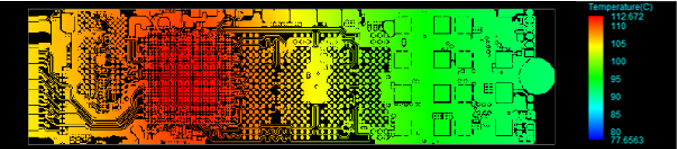
Simply seeing “−40°C to 85°C” on a datasheet is not enough. “I-Temp” often just means the drive survives sitting in those temperatures, not necessarily working reliably while the temperature is rapidly changing.
The real danger is Cross-Temperature stress. This happens when data is written at one temperature (e.g., a cold morning startup at −20°C) but read back at a completely different one (e.g., after the machine heats up to +70°C). This thermal gap physically shifts the voltage needed to read the data, leading to read errors and system crashes.
Procurement Checklist for Temperature:
- Check the Definition (Ambient vs. Tcase): Does the rating apply to “Ambient” (room air) or “Tcase” (surface of the drive)? A drive inside a metal box will be much hotter than the room air.
- Verify Airflow (LFM) Requirements: Does the spec sheet assume active cooling? Check the Linear Feet per Minute (LFM) requirement. If your system is fanless (0 LFM), an I-Temp drive might still overheat because it cannot dissipate its own self-generated heat.
- Verify Cross-Temp Validation: Ask whether the vendor tests for cross-temperature robustness — whether the firmware adjusts its read voltage to recover data written cold and read hot.
- Sensor Placement: Check that the thermal sensor sits near the NAND and controller, so throttling triggers on real heat rather than a cool spot that masks it.
Learn more: SSD Temperature Specs: What the Numbers Really Mean · ATP AcuCurrent: Innovative Signal Integrity Optimization Technology
Will the SSD be used primarily for booting the system or for storing data?
The goal is simple: the SSD must outlast the system it powers. That means matching endurance to the actual job, not to a generic spec sheet. Industrial usage splits into two categories, each with its own stress factor:
- Boot Drives (Read-Intensive): These drives hold the Operating System (OS). They don’t face heavy write traffic, but they face two read-related threats that work differently. Read disturb: repeatedly reading the same OS files (during boot-up or background checks) applies small electrical stress to neighboring cells in the same block, which can eventually corrupt nearby “hot” data. Data-retention loss: rarely-rewritten “cold” data slowly loses its stored charge over time, especially at high temperature. For boot drives, the procurement priority isn’t high write endurance — it is validated read-disturb handling and data retention.
- Data/Storage Drives (Write-Intensive): These drives bear the brunt of saving your application’s data. Engineers often request these based on TBW (Terabytes Written) or DWPD (Drive Writes Per Day), but these numbers can be misleading if taken from a standard commercial spec sheet. A reliable endurance rating must account for the “messy” reality of industrial work—including a high Write Amplification Factor (WAF) from random data patterns, extreme temperatures, and 24/7 active use. A drive bought without validating those stressors fails early.
Learn more: SSD Endurance Specs: Why the Numbers Do Not Tell the Whole Story · Simulating SSDs Payload Diversity and Realistic Usage
The spec sheet shows high speed, but will it last in the real world?
Usually not at that number. Datasheet figures are burst performance — a short sprint using SLC cache. What matters for 24/7 logging or video recording is sustained performance once that cache is full, where an unvalidated drive can slow dramatically. Ask for the sustained floor, not the peak: Understanding the SSD Cache.
My system is battery-powered or fan-less. Can NVMe SSD power be tuned to prevent overheating?
Yes — power, performance and thermals are inextricably linked, and in a sealed or fanless enclosure the heat a drive generates has nowhere to go. Rather than letting the drive hit its limit and throttle hard, its consumption can be tuned at the source: PCIe link power states (Active State Power Management, ASPM), NVMe device idle states (Autonomous Power State Transition, APST), reduced PCIe lane width, a lower flash clock, and finer control of drive strength and interleaving. The procurement question: can the vendor tune these for your thermal budget, and will they state the resulting power envelope? Detail: AceTT thermal throttling, on drives equipped with it, and NVMe thermal management.
What Should You Evaluate Before Selecting an Industrial SSD Supplier?
The “best” SSD is useless if it disappears from the market in six months or fails in a way the vendor cannot explain. Before adding a supplier to your Approved Vendor List, evaluate four things beyond the datasheet headline numbers — whether you’re an OEM, a system integrator, or a design-in team.
- Reliability you can interrogate. Ask how the MTBF was derived. Most figures come from statistical prediction models such as Telcordia SR-332 or MIL-HDBK-217F — legitimate methods, but predictions built on stated assumptions, not drive-level test results. An MTBF describes the rate of random failures across a population of drives during their useful life at a stated temperature; it excludes wear-out and is not the service life of an individual drive. Where a programme warrants it, a supplier should also be able to run a drive-level reliability demonstration test and report its parameters. Pair any MTBF with an endurance rating (TBW/DWPD) against your real read/write mix.
- Supply-chain stability. Ask for a Controlled Bill of Materials (BOM) down to the specific flash and controller, and for the vendor’s Product Change Notification (PCN) terms in writing. What matters is not a vague promise of early warning but the defined windows that follow a notice: a period to place last-time-buy orders, and a period for last-time shipment against them. They are set per product line, so get the ones that apply to your part at design-in. A 3–5 year roadmap is a reasonable ask, but treat it as a plan rather than a guarantee — no module house can extend a die the memory maker has stopped producing.
- Engineering and customization depth. Does the partner have the in-house capability to customize firmware and run validation that mimics your environment — rapid power-cycling, thermal shock, your specific workload — rather than handing you an off-the-shelf part validated only on their bench? This “design-in” support is what makes a drive work in your system, not just on their test bench.
- Advanced failure analysis and debugging. Real-world failures are rarely simple dead drives; they are intermittent corner cases where the SSD and host system stop talking. Can the vendor replicate the failure in their lab, find root cause, and deliver a tailored fix that fits your host’s behavior and protocols?
A supplier strong on all four lowers total cost of ownership even when the unit price is higher. One caveat: not every programme needs the deepest engagement on every axis — a read-light boot device in a short-lived product may not justify custom firmware validation. Match the depth of due diligence to the cost of getting it wrong.
Why Is BOM Control and Lifecycle Management Critical for Industrial Storage Deployments?
BOM control matters because two drives with the same model number and the same spec sheet are not necessarily the same drive. A controlled BOM is a documented commitment that the NAND flash die, the controller, the firmware revision — and the DRAM, on designs that use one — will not be substituted without a formal Product Change Notification (PCN). That commitment is what keeps a qualification valid over time.
The risk it addresses is a vendor without BOM discipline quietly substituting whatever flash is current to keep a part number in stock. The label is identical; the silicon underneath is not. A different NAND die can change endurance, data-retention behavior, performance, power draw and even host compatibility — and it can break a boot image or firmware configuration you spent months validating. An industrial system is often designed to ship and be supported for 5 to 10 years or more, so a substitution three years in lands against a qualification you can no longer reproduce.
This is where lifecycle management comes in. A PCN is the vendor’s formal notice that something in the product is going to change, and the windows that follow it are what give you room to act: a period to place last-time-buy orders, and a period for last-time shipment against them. Those windows are set per product line, so get the ones that apply to your part in writing at design-in. In regulated industries, where requalification can mean re-running a formal validation or recertification, those terms are often worth more than the drive itself.
The tradeoff is real: a controlled BOM and a long-life program usually cost more per unit, and they often specify an older, proven node rather than the newest one — you trade the price curve for behaviour you have already measured in your own system. For a product you intend to ship and retire within a year, a standard commercial drive without a controlled BOM can be the rational choice. BOM control earns its premium when the cost of an unexpected change exceeds the price difference.
What Happens When the NAND Itself Reaches End-of-Life?
A controlled BOM does not cover it. It stops your supplier substituting parts without telling you; it has no effect on whether the memory maker keeps producing the die at all — and in 2026 that has become the shorter of the two clocks.
The mechanism is upstream. AI demand is being met mainly by accelerating node migration rather than by adding wafer capacity: TrendForce continues to point to no meaningful new NAND wafer capacity in the near term, and Taiwan’s Commercial Times has tracked the major DRAM makers setting DDR4 end-of-life timetables and converting those lines to newer processes. Each migration pulls capacity away from the mature nodes long-lifecycle designs are built on, so the roadmap of the die under your drive is shorter than it would have been three years ago. Consumer NAND moves to a new generation every 12 to 24 months, but the number that stops a build is when the specific die you qualified goes end-of-life — a separate decision, made on the memory maker’s own capacity economics and rarely announced far ahead.
| Silent substitution | Die end-of-life | |
|---|---|---|
| What causes it | Your supplier changes the BOM | The memory maker retires the node |
| Who decides | The module house | The memory maker |
| What a controlled BOM does | Prevents it | Nothing — it cannot extend a die |
| What a last-time buy does | Not applicable | Defers it, does not remove it |
| What actually covers you | A PCN policy with terms you can hold | A second component qualified before you need it |
Table note: this is ATP’s framing of two distinct supply risks for procurement planning — who decides, and what actually covers you — not a quotation from a datasheet or a published standard.
No module-level engineering extends the life of a die that is no longer produced, and a last-time buy defers that problem rather than removing it. What covers the risk is having a qualified alternative in place before you need it. Wherever a project’s lifecycle requirements justify it, ATP takes a longevity-through-agility approach: designing in and validating more than one design-in device (DID), so that when one supply line reaches end-of-life, a qualified alternative has already been validated against your system.
That approach carries real cost — each additional DID brings qualification, firmware and validation work on both sides — and single-sourcing remains reasonable for short-lifecycle systems. For a five-to-ten-year deployment it is increasingly cheaper than an unplanned re-qualification mid-programme. It also makes last-time-buy planning worth discussing at design-in rather than at the notice: the earlier a supplier sees your demand, the more firmly it can commit supply against it.
The Bottom Line: Procurement as a Strategic Advantage
Ultimately, buying industrial SSDs is not about paying more for the same capacity; it is about paying for certainty. When you choose a drive with Power Loss Protection, cross-temperature validation, a controlled BOM and a qualified alternative component, you are buying insurance against field failures, protection against unannounced component swaps, and the confidence that your product performs as reliably in Year 5 as it did on Day 1.
At ATP Electronics, we don’t just sell SSDs; we strive to build that certainty. With over 30 years of manufacturing ownership, we provide the controlled configurations, deep engineering customization, and long-term supply stability required to turn your storage choice into a competitive advantage.
Frequently Asked Questions (FAQ)
Q1: What should OEMs evaluate before selecting an industrial SSD supplier?
A: Look past price-per-gigabyte at four things. First, reliability you can interrogate: whether the MTBF is a statistical prediction (Telcordia SR-332, the method behind most figures) or a drive-level demonstration test, plus an endurance (TBW/DWPD) rating for your real workload. Second, supply-chain stability: a controlled bill of materials (BOM) and the Product Change Notification (PCN) terms in writing. Third, engineering depth to customize firmware and validate against your environment. Fourth, the ability to reproduce and root-cause field failures. A supplier strong on all four lowers total cost of ownership even when the unit price is higher.
Q2: Why is BOM control and lifecycle management critical for industrial storage deployments?
A: Because two drives with the same model number are not the same drive if their components differ. A controlled bill of materials (BOM) pins the exact NAND flash, controller, firmware — and the DRAM, on designs that use one — so a vendor cannot silently substitute parts between orders. This matters because industrial systems often ship for 5–10+ years while consumer NAND moves to a new generation every 12–24 months, and an unannounced component swap can change endurance, performance, power and compatibility, invalidating a qualification you already paid for. A controlled BOM protects the validity of that qualification against a silent substitution. It does not extend the production life of the component itself: if the memory maker retires the die, no module-level engineering can reverse that decision, and a last-time buy only defers it. That is why long-lifecycle programmes pair a controlled BOM with a second device qualified against the system before it is needed.
Q3: Does a controlled BOM protect me if the NAND itself goes end-of-life?
A: No, and it is important to be clear about the difference. A controlled BOM stops a supplier substituting components without telling you — that is what keeps your qualification valid. It has no effect on whether the memory maker keeps producing the die. That decision is made upstream, it reaches every module house at the same time, and no module-level engineering can reverse it. A last-time buy defers the problem for as long as your buy covers. What removes it is having a second device already qualified against your system, which is why long-lifecycle programmes increasingly design in more than one.
Q4: Why can’t I just use the same commercial SSD for a five-year deployment?
A: Mainly because it may not stay available. Commercial parts are not held to a controlled BOM, so the flash inside can change without notice and the model can be discontinued long before your five years are up, leaving you to requalify mid-programme. An industrial drive with a controlled BOM and stated Product Change Notification terms is built to be re-orderable, and a second device can be qualified in advance where the lifecycle warrants it. It also has to survive the conditions — commercial drives wear faster under sustained writes, wide temperatures and unstable power (see consumer vs. industrial SSDs).
Q5: What is a Product Change Notification (PCN)?
A: A Product Change Notification (PCN) is a supplier’s formal notice that something in a product — a component, process, firmware revision or specification — is going to change. The absence of a PCN policy is itself a warning sign: it usually means components can change without notice. ATP’s PCN policy defines two windows that follow a notice: a period to place last-time-buy orders, and a period for last-time shipment against them. Both are set per product line, so ask for the terms that apply to your part. Where a memory maker sets an end-of-life date, ATP works those windows in step with the maker’s own timing, and supports the move onto a qualified alternative BOM where a project needs it.