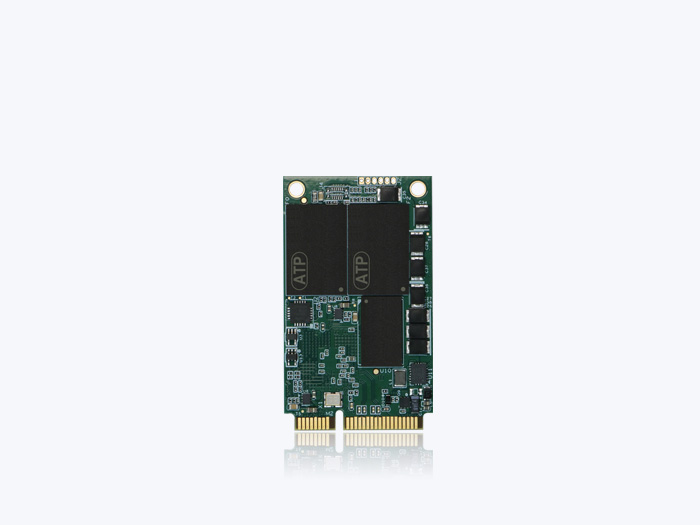
Industrial SSDs prevent data corruption in unstable power environments in four layers: an MCU that tells a momentary glitch apart from a real outage, capacitors that hold up power long enough to finish the write in progress, firmware recovery that rebuilds the mapping tables at the next boot — and a health check on the capacitors themselves. This article covers the fourth layer, the one that fails silently, and how ATP PLP Diag closes it.
Key Takeaways — Surviving Unstable Power
Industrial SSDs prevent data corruption in unstable power environments in four layers: the drive first tells a momentary glitch apart from a real outage, then holds up power long enough to finish the write in progress, then rebuilds its mapping tables on the next boot — and finally, verifies that the hardware doing the holding up is still healthy. Most designs cover the first three. The fourth is the one that fails silently.
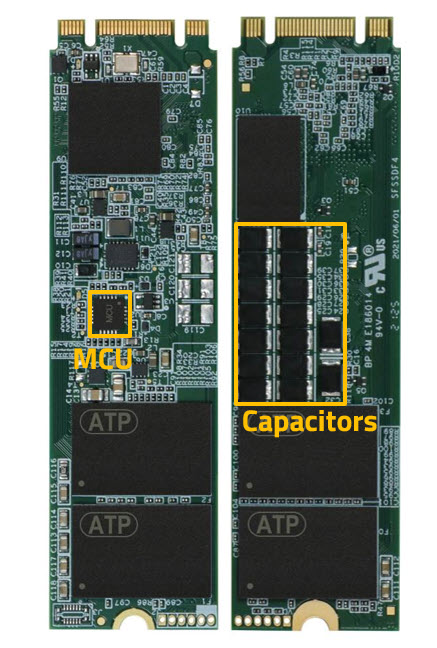
- Layer 1 — tell instability apart from failure. A microcontroller (MCU) on the drive watches the input rail and de-glitches it, so a ripple or a brief dip does not trigger a false cache flush and leave the drive hung. It also cuts off the input when voltage runs above the drive’s rated tolerance. See how ATP’s MCU-based PLP array handles power management.
- Layer 2 — hold up power to finish the write. When the MCU confirms a genuine power loss, polymer tantalum capacitors supply reserve power so the controller can flush the DRAM cache to NAND and complete the last program operation. This is the only layer that protects data in flight.
- Layer 3 — recover the index. Firmware-level protection such as Sudden Power-Off Recovery (SPOR) restores the drive’s firmware and its logical-to-physical mapping tables on the next power-up. It cannot save in-flight data, but it is what keeps a damaged index from making the entire drive unreadable. See the four levels of power-loss protection.
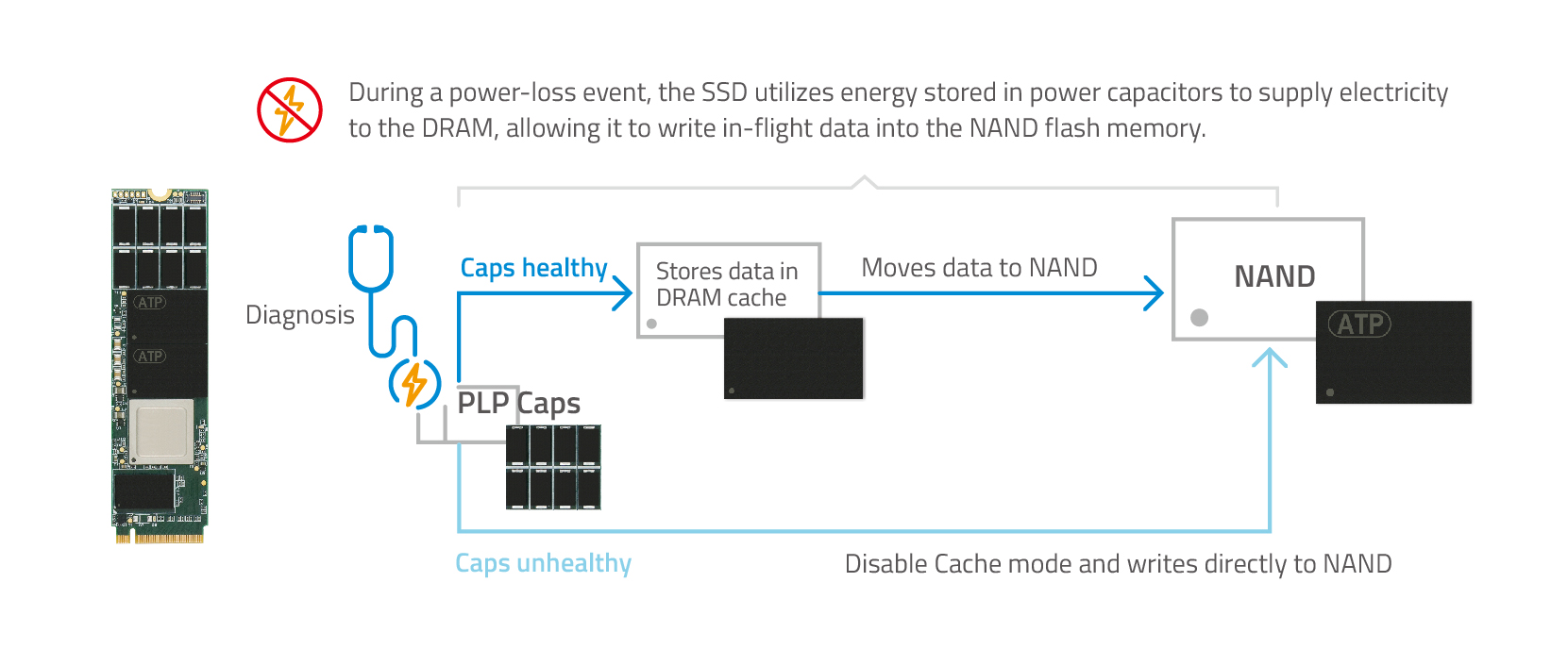
- Layer 4 — verify the protection itself. Capacitors age. Dielectric breakdown, mechanical cracking, high or fluctuating temperature, out-of-spec voltage, and repeated charge/discharge cycles all degrade them — and a drive whose capacitors have quietly died still reports itself as PLP-protected. ATP PLP Diag checks capacitor health, and when the MCU finds the capacitors are no longer healthy, the drive disables the write cache and writes directly to NAND rather than staging data the capacitors can no longer protect. Users can also query PLP status with a SMART command.
- You do not always need all four layers. If the system sits behind a UPS, shuts down cleanly, and is read-dominated after provisioning, firmware-level protection is often enough — and a drive without a capacitor array is one less aging component to monitor. Capacitor-backed hardware PLP with health diagnostics earns its cost where power is genuinely unstable, where the drive is unattended or hard to reach, and where an unnoticed protection failure would only surface as an end-to-end data error months later.
“Prevention is better than cure.” This is true, not only for preventing illnesses, but also for data that may be compromised or lost forever because of unmonitored capacitor health. Hardware Power Loss Protection (HW PLP) with capacitors is crucial for safeguarding in-flight data during power outages. These capacitors provide holdup power long enough for the SSD controller to flush the data held in its cache to the NAND flash for safe storage. However, capacitors can age or fail over time, making the HW PLP feature ineffective, putting the in-flight data at risk. Worse, users may not be aware that the capacitors may have already been malfunctioning for some time without any remedy at hand.
Why Proactive Monitoring Matters: How Healthy Are Your SSD’s PLP Capacitors?
For solid state drives (SSDs), HW PLP mechanisms safeguard against data loss during sudden power loss events by using capacitors that ensure efficient power supply during the critical process of flushing DRAM cache data to the NAND, protecting valuable information during sudden power-loss events.
How Do Industrial SSDs Prevent Data Corruption in Unstable Power Environments?
Industrial SSDs prevent data corruption in unstable power environments by layering four defenses: a microcontroller that distinguishes a momentary disturbance from a real power loss, a capacitor array that supplies holdup power so the write in progress can finish, firmware recovery that rebuilds the drive’s mapping tables on the next power-up, and — the layer this article is about — a health check on the capacitors themselves, so the protection is verified rather than assumed. Remove any one layer and a specific failure mode reopens.
“Unstable” is worth defining, because it is not the same problem as a clean outage. An operational technology (OT) site sees ripple and voltage sag on a shared rail, brownouts, surges when heavy equipment starts, and frequent, abrupt power cycling — often on legacy sub-systems that were never designed to signal a shutdown. Each of those stresses a different layer:
| Power condition | What protects the drive | What goes wrong without it |
|---|---|---|
| Ripple, noise, or a brief voltage dip | MCU de-glitch logic decides whether the dip is instability or a genuine loss before acting on it | Every glitch triggers a false cache flush; the drive can hang or fail to be recognized |
| Surge or over-voltage on the input rail | MCU-controlled switch cuts the input off once voltage exceeds the drive’s rated tolerance | Irreversible damage to the drive’s components |
| Complete power loss during a write | Polymer tantalum capacitors hold up the rail so the controller flushes the DRAM cache to NAND and completes the last program operation | In-flight data is lost, and an interrupted program or erase can leave cells unreadable |
| Frequent, abrupt power cycling | Firmware recovery (SPOR) restores firmware and the logical-to-physical mapping tables at the next power-up | A damaged mapping table can make the whole drive unreadable, even though the NAND cells still hold valid data |
| The protection hardware degrading over years in the field | PLP Diag checks capacitor health; on an unhealthy result the drive disables the write cache and writes directly to NAND, and users can read PLP status with a SMART command | PLP is silently ineffective — the failure surfaces only as an end-to-end data error at some later power cycle, or as a returned drive |
The fourth row is the one most specifications miss. A power-loss protection feature is usually treated as a checkbox at design-in: the drive either has capacitors or it does not. But a capacitor is a consumable component in a way a NAND die is not — it degrades under exactly the conditions that made you specify PLP in the first place, and nothing in a conventional drive tells you when it has stopped working. ATP PLP Diag is a proactive capacitor health check that detects a degrading PLP array before it fails, so the drive can fall back to a safe write path instead of continuing to stage data in a cache the capacitors can no longer protect. It builds on the capacitor monitoring already performed by ATP’s MCU-based PLP array: the difference is that the result no longer stays inside the drive — it is reported to the host through SMART, and the drive changes its write behavior on its own when the answer is bad.
One honest boundary: not every deployment needs all four layers. A system behind a UPS that performs orderly shutdowns, or a drive that is written once at provisioning and then read-mostly, has little in-flight data to lose, and firmware-level protection covers most of its exposure. The four-layer case is strongest in the opposite situation — unstable or unattended power, continuous writes, and a drive in a location where discovering the problem after the fact means a truck roll. If that describes your deployment, specify capacitor-backed hardware PLP and ask the vendor how the capacitors are monitored over the drive’s service life. ATP implements MCU-based hardware and firmware PLP across its industrial SATA and NVMe SSDs.
Common Causes of Capacitor Failure
What people might not realize is that capacitors of any kind may age and/or fail over time due to:
- Dielectric breakdown, which is the inability of an insulating substance to stop current flow when electrical stress is applied, short-circuiting the capacitor
- Mechanical stresses causing cracks, defects, or damages
- Environmental extremes such as high or fluctuating temperatures accelerate breakdown
- Voltage/current stresses. Operating beyond design specifications can speed up deterioration
- Aging and wear. Repeated charge/discharge cycles degrade performance
What is more concerning is that users may remain unaware that their SSD’s power loss protection has been compromised, potentially putting their data at risk without their knowledge.
Consequences of Unmonitored Capacitor Health
When capacitors fail without being detected, the following things may happen:
- PLP Failure. When capacitor functionality is compromised, the PLP mechanism is unable to safely move data from the cache to the SSD, risking loss or corruption.
- Data Integrity Issues. If the cached data is not safely transmitted to the SSD, critical information may be jeopardized.
- Undetected Hardware Damage. In rare cases, a capacitor failure combined with overcharging can cause burns, putting the surrounding system at risk.
- Operational Losses. Increased downtime, unpredictable system crashes, and disrupted operations lead not only to data loss but losses to the bottom line as well.
ATP PLP Diag: Proactive Capacitor Health Monitoring
ATP HW PLP arrays pair polymer tantalum capacitors with a microcontroller unit (MCU) that monitors the input rail and the capacitors’ condition. See how the MCU-based PLP array handles power management. Providing an extra layer of protection is PLP Diag, which builds on that MCU-level capacitor monitoring: the result no longer stays inside the drive — it is reported to the host through SMART, and the drive changes its write behavior on its own when the capacitors are no longer healthy.
ATP PLP Diag is a proactive capacitor health check that detects a degrading PLP array before it fails, so the drive can switch to a safe write path instead of continuing to expose in-flight data. (The actual mechanism may differ across SKUs.)
When the MCU determines that the capacitors are no longer healthy:
- Bypass the DRAM cache. The SSD disables the write cache, because that temporary storage depends on the capacitors’ holdup power to be flushed safely.
- Write directly to the NAND. The SSD then resumes writing in direct mode, bypassing the cache.
Two Ways to Diagnose
- Automatic Check. SSDs automatically check the PLP status and react to faulty statuses to avoid burning out or exposing in-flight data to the risk of corruption or loss.
- SMART CMD Integration. Users may issue a SMART command (CMD) to verify the PLP status themselves.
PLP Diag Benefits
Proactive preparedness is paramount in maintaining data integrity and system reliability. ATP PLP Diag offers the following benefits:
- Richer Data Protection and Integrity. By constantly monitoring capacitor health, proactively diagnosing any issues, and taking preemptive measures, PLP Diag ensures the success of the PLP mechanism in protecting data.
- Minimal Downtime and Maximum Reliability. Real-time capacitor health monitoring and diagnosis help prevent unplanned downtime, keeping both the system and storage device reliable at all times.
- Fewer Unplanned Replacements. Detecting a degrading PLP array early lets you schedule replacement at the next maintenance window, instead of discovering the failure after a power cycle has already put data at risk.
- SMART Integration. By allowing users to check the PLP status through SMART commands, PLP Diag offers easy, convenient, and proactive maintenance of their device reliability.
Use Case Scenario 1: Capacitor Failure Jeopardizes Server Operation

Background. In-flight data protection via HW PLP is a standard feature of a server manufacturer’s SSD drives. Over time, capacitor failure has been identified as one recurring cause of these SSD malfunctions.
Problem. Capacitor health is usually not monitored, so capacitor failures often go unnoticed by server users or maintenance services. These failures are only discovered when end-to-end data (E2E) errors occur during power cycle events. The SSD is then sent back to the vendor for analysis. In rare cases, a capacitor failure combined with overcharging can result in burns and pose a risk to the entire server’s safety.
ATP Solution. ATP PLP Diag automatically checks the capacitor status and switches the drive to Direct Mode when a potential capacitor failure is detected, so in-flight data is no longer staged in a cache the capacitors can no longer protect. As the users themselves can check the status and functionality of the capacitors, they do not need to send the SSD back to the vendor, preventing downtime and disruption in the operations.
Use Case Scenario 2: Sudden Power Loss Events Often Challenge PLP in an OT Environment
Background. In an Operational Technology (OT) environment, sudden power loss events often challenge the SSD’s HW PLP mechanism. These environments frequently experience abrupt power interruptions due to constraints in legacy embedded systems or sub-systems, which can test the robustness of PLP features in SSDs and other storage devices.
Problem. PLP failure rates are higher in frequent power on/off cycles, whether normal or unexpected. As subsystems are often scattered and decentralized, they are expected to operate unnoticed and unattended. Users realize that they essentially have no way to detect any failed PLP on SSDs installed within these systems. Without a way to read PLP status in the field, that risk stays invisible until a power cycle exposes it.
ATP Solution. By using ATP SSDs with PLP Diag, embedded users can rely on the SSD to manage already-reduced PLP failures. It automatically checks the capacitor status and switches to Direct Mode in the event of a capacitor failure without disabling onsite operations. Users can leave the SSD unattended until the scheduled routine maintenance and check if any replacement is required.
Conclusion
As more industries and enterprises rely on SSDs for reliable data storage under all circumstances, especially during unpredictable power loss events, ATP Electronics strengthens its SSDs’ MCU-based HW PLP design with PLP Diag.
By proactively monitoring the health of its polymer tantalum capacitors and responding to potential failures that expose the in-flight data to risks, PLP Diag closes the gap that unmonitored capacitor aging leaves open, so a drive’s power-loss protection is verified rather than assumed.
For more information on the ATP PLP Diag Technology, visit the ATP website or contact an ATP Representative in your area.
Frequently Asked Questions (FAQ)
Q1: How do industrial SSDs prevent data corruption in unstable power environments?
A: Industrial SSDs prevent data corruption in unstable power environments with four layers of protection: an on-drive microcontroller (MCU) that de-glitches the input rail so a momentary dip is not mistaken for an outage and an over-voltage surge is cut off; a polymer tantalum capacitor array that supplies holdup power so the controller can flush its DRAM cache to NAND and complete the last write; firmware recovery such as Sudden Power-Off Recovery (SPOR) that rebuilds the drive’s mapping tables on the next power-up; and a health check on the capacitors themselves, so a protection array that has aged out is detected instead of silently failing. Consumer SSDs typically implement only the firmware layer, which is why they lose in-flight data on an unexpected power cut.
Q2: What is ATP PLP Diag, and how is it different from standard power-loss protection?
A: ATP PLP Diag is a proactive capacitor health check that verifies whether an SSD’s hardware power-loss protection is still working, rather than assuming it is. Standard hardware PLP provides the capacitors. ATP’s MCU-based PLP array already monitors their condition on the drive; PLP Diag is the layer that surfaces that result to the host through SMART and acts on it automatically. When the MCU determines the capacitors are no longer healthy, the SSD disables the write cache and writes directly to the NAND, so data is not staged in a cache that the capacitors can no longer flush. The check runs automatically, and users can also query PLP status with a SMART command.
Q3: How can I tell whether my SSD’s power-loss protection capacitors have failed?
A: On a drive with capacitor health monitoring, you issue a SMART command and read the reported PLP status — no drive removal, no vendor return. On a drive without it, you generally cannot tell: capacitor failure produces no symptom during normal operation, because the capacitors are only called on during a power-loss event. The failure typically surfaces the first time it matters, as an end-to-end (E2E) data error during a power cycle, after which the drive is sent back for analysis. That gap between the failure and its discovery is the reason to specify monitoring rather than to schedule inspections.
Q4: What happens to an SSD when its power-loss protection capacitors fail?
A: It depends entirely on whether the failure is detected. Undetected, the drive keeps caching writes as though it were protected, and the next unexpected power loss corrupts or loses the in-flight data; in rare cases a capacitor failure combined with overcharging can cause burns and put the surrounding system at risk. Detected, the drive changes behavior instead: it disables the write cache and writes directly to the NAND, giving up cached-write performance to keep data out of a buffer that can no longer be safely flushed. Capacitors reach that point through dielectric breakdown, mechanical cracking, high or fluctuating temperature, out-of-spec voltage or current, and the cumulative effect of repeated charge/discharge cycles.
Q5: Does every industrial SSD need capacitor-backed power-loss protection?
A: No — and specifying it where it is not needed adds an aging component you then have to monitor. If the system runs behind a UPS and shuts down in an orderly way, or if the drive is written once at provisioning and read-mostly thereafter, there is little in-flight data at risk and firmware-level protection covers most of the exposure. Capacitor-backed hardware PLP is the right call when writes are continuous, when the power source is genuinely unstable or the system is abruptly power-cycled, and when the drive is unattended or expensive to reach. In that last case, ask specifically how capacitor health is monitored over the deployment’s service life — a PLP array that has aged out offers no more protection than no PLP at all.