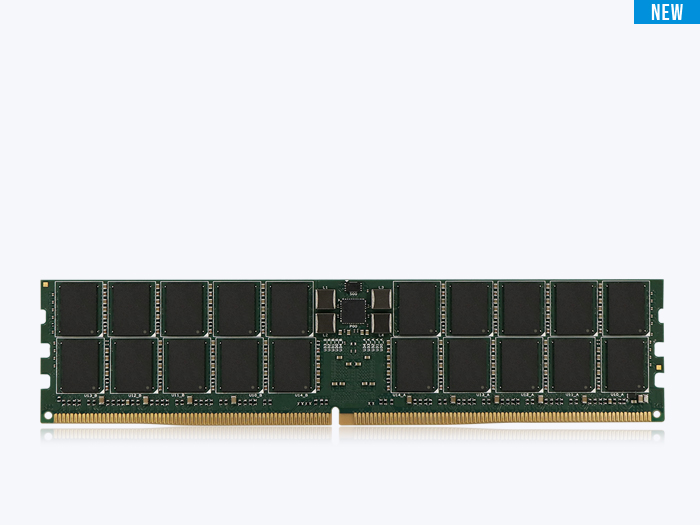
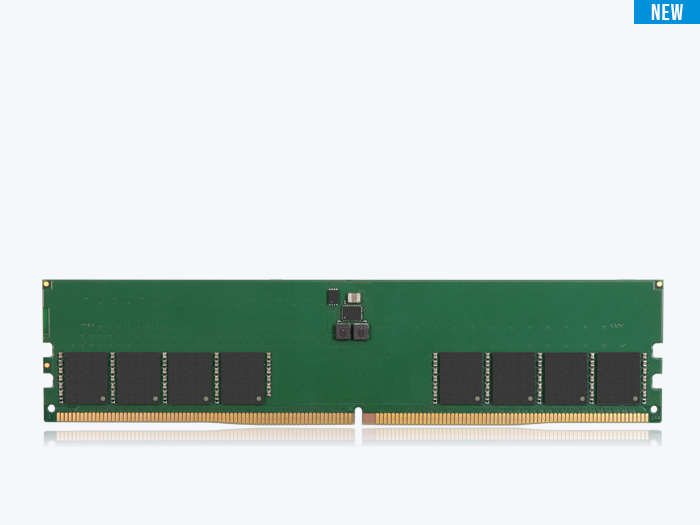
x8 and x16 describe how wide each DRAM chip is — 8 or 16 bits per access — and that single choice changes how many chips a module needs, how it handles ECC, how much board space and power it draws, and, at the margin, how fast it runs. The same capacity can be built either way.
Key Takeaways
- x8 and x16 chips can hold identical capacity but fill a channel with a different chip count. A 4Gx8 chip and a 2Gx16 chip are both 32 Gb; the difference is whether the part is 8 or 16 bits wide.
- x8 is the standard for high-capacity and ECC memory. Eight x8 chips fill a 64-bit channel, and a 9th or 10th chip adds ECC cleanly — which is why servers and high-performance desktops use it.
- x16 minimizes chip count, board area, and power. Only four x16 chips fill a 64-bit channel, which is why x16 dominates laptops, SO-DIMMs, and compact embedded devices.
- x8 devices usually expose more bank groups than x16 parts of the same generation. More bank-level parallelism gives x8 a small but real edge in multi-threaded workloads, where the controller can spread requests across more banks.
Same capacity, different construction
When two memory modules advertise the same capacity, it is tempting to treat them as interchangeable. They often are not. The same total capacity can be built from x8 chips or x16 chips, and that choice changes the chip count, the board, the power budget, and — at the margin — performance. Here is how the two configurations differ and when each one is the right call.
Start with the fact that hides the tradeoff: a 4Gx8 chip and a 2Gx16 chip store exactly the same amount of data. The 4Gx8 is 4 billion locations × 8 bits = 32 Gb. The 2Gx16 is 2 billion × 16 bits = 32 Gb. Identical density, different organization.
| Configuration | Depth | Width | Density | Chips per 64-bit rank |
|---|---|---|---|---|
| 4Gx8 | 4 billion | 8 bits | 32 Gb | 8 |
| 2Gx16 | 2 billion | 16 bits | 32 Gb | 4 |
Table 1. The same 32 Gb density built two ways — identical capacity, different chip width and chip count.
The choice between them comes down to the physical design of the module and the requirements of the CPU’s memory controller. Because a standard channel is 64 bits wide, the chip width decides how many chips it takes to fill one rank.
Why x8 dominates servers and high-capacity DIMMs
The x8 configuration is the industry standard for high-capacity server and desktop memory, for two reasons. First, module density: filling a 64-bit channel with x8 chips takes eight chips, and high chip counts let a module reach large capacities and add ranks. Second, ECC support: enterprise systems use an extra 8 bits of bus width for Error Correction Code, so a 64-bit data path becomes 72 bits. With x8 chips, you simply add a ninth chip to the rank to carry those check bits — the layout extends naturally.
That clean extension to ECC is a large part of why you rarely see x16 in servers.
Why x16 suits laptops and compact designs
The x16 configuration trades expandability for efficiency. Filling a 64-bit channel takes only four x16 chips, and a lower chip count brings real advantages: fewer chips allow smaller PCBs, which matters in thin laptops, tablets, and SO-DIMMs. Fewer chips also usually mean lower power draw for the same total capacity.
The tradeoff is fewer banks available to the CPU, which can cost a little performance — the subject of the next section.
The performance tradeoff: banks and bank groups
Even when capacity is identical, an x8 chip is often slightly faster in multi-threaded workloads. The reason is internal organization. DRAM is divided into bank groups, and an x8 chip typically has more bank groups available than an x16 chip of the same generation.
When the CPU can spread its requests across more banks — what engineers call bank-level parallelism — it spends less time waiting for a bank to refresh or close before it can be accessed again. More banks in flight means fewer stalls.
A real-world analogy makes the mechanism concrete: picture a warehouse with eight narrow doors (x8) versus one with four wide doors (x16). Both hold the same inventory, but the way goods move in and out changes with the number of doors. More doors let more traffic flow at once, even if each door is narrower.
Short summary
- x8 is optimized for expandability and reliability — the standard for high-performance PCs and servers, and the natural fit for ECC.
- x16 is optimized for physical footprint and cost — the standard for thin laptops and integrated devices.
Neither is universally better. Choose x8 when capacity, ECC, and parallelism matter most; choose x16 when board space, chip count, and power are the binding constraints — the trade ATP weighs constantly in compact, power-sensitive industrial and embedded designs.
Frequently Asked Questions (FAQ)
Q1: What is the difference between x8 and x16 DRAM?
A: x8 and x16 refer to the data-bus width of each DRAM chip — 8 bits or 16 bits per access. An x8 module needs eight chips to fill a 64-bit channel; an x16 module needs only four. Width affects chip count, ECC layout, board space, power, and parallelism.
Q2: Is x8 or x16 memory faster?
A: x8 is often slightly faster in multi-threaded workloads because x8 chips usually expose more bank groups than x16 chips of the same generation, giving the controller more bank-level parallelism. The difference is modest and workload-dependent.
Q3: Why do servers use x8 instead of x16?
A: Servers need high capacity and ECC. Eight x8 chips fill a 64-bit channel, and adding a ninth chip extends the layout to a 72-bit ECC bus cleanly. x16 cannot add ECC as naturally and offers fewer banks.
Q4: Does x16 memory use less power than x8?
A: Usually yes, for the same total capacity, because x16 fills a channel with half as many chips. Fewer chips also allow smaller boards. The tradeoff is fewer banks and slightly less parallelism.