Memory errors — soft or hard, correctable or uncorrectable — can degrade performance or crash a system outright, and in mission-critical applications the consequences are costly downtime. This post explains the common memory error types, how ECC DIMMs detect and correct them, and how ATP’s 100% ATE functional testing and TDBI burn-in screen out the weak ICs behind the hard errors no ECC can repair.
Key Takeaways
- ECC memory reduces downtime in industrial PCs by detecting and correcting single-bit memory errors in real time — a corrected error becomes a log entry instead of a crash that ends in a site visit. Single-bit soft errors are the most common memory error type in the field.
- Memory errors are either soft or hard. Soft errors corrupt data randomly without damaging the hardware and clear on reboot; hard errors are permanent physical defects that recur until the module is replaced. ECC corrects the first kind as it happens; an error that keeps recurring points to a failing module that needs replacement.
- Standard SECDED ECC corrects single-bit errors and detects — but cannot correct — double-bit errors. Systems that cannot tolerate any uncorrectable error can specify platforms with Chipkill (Advanced ECC), which keeps data recoverable even if an entire DRAM chip fails.
- ECC is a platform decision, and not every industrial PC needs it. The processor and memory controller must support ECC; for non-critical workloads in climate-controlled, easily serviced installations, non-ECC modules such as ATP’s Momentum line are adequate and cost less.
- Error correction complements component screening — it does not replace it. ATP tests 100% of its DRAM modules with ATE functional testing and TDBI burn-in to screen out ICs prone to early-life failure: the hard errors no ECC can repair.
Why Memory Errors Matter
Defective main memory can disrupt business operations with performance degradation or hardware crashes, leading to costly downtime. Dynamic random access memory (DRAM) modules typically have built-in mechanisms that address memory errors. This post answers the most common questions on computer memory errors to help you ensure high availability and maximum reliability of DRAM installed in your mission-critical systems.
What Are the Types of Memory Errors?
Memory errors fall into two broad categories:
Soft memory errors are those that randomly corrupt memory bits and alter stored data but do not cause physical damage to the memory module. Soft memory errors damage the data being processed rather than the system hardware, but in mission-critical applications such as medical equipment, industrial controllers, autonomous cars, security/surveillance systems and data centers, uncorrected soft errors may lead to catastrophic outcomes.
There are two types of soft memory errors:
- Chip-Level Soft Errors are usually due to the radioactive decay of elements in the memory chip packaging. When these alpha particles hit the chip, they cause the cell to change its state to a different value, create an imbalance in the electrical properties of the chip, and cause stored data to be corrupted. Due to advancements in memory design, packaging materials, and manufacturing technology, these types of errors are now rare.
- System-Level Soft Errors usually occur when the data being processed is hit with a glitch or noise while data is on the data bus. Noise is interference or static that destroys signal integrity and can come from electromagnetic interference (EMI) radio waves, electrical wiring, lightning, bad connections, and other sources. The noise could be misinterpreted by the system to be a data bit and uses or executes the bad data bit or program code, resulting in an error.
Hard memory errors are errors that keep recurring as a result of hardware or physical defects on the memory module. Hard memory errors are commonly caused by physical damage such as electrostatic discharge; operating a system beyond the memory’s rated speed can also produce recurring errors that mimic hard errors. Other causes include environmental factors such as temperature, shock/vibration, electrical/voltage stress or physical stress. Mishandling, aging, or manufacturing defects can also affect the reliability of hardware components. Hard errors are usually permanent and require module replacement.
How Can You Tell if the Memory Error Is Soft or Hard?
Soft memory errors can typically be rectified by rebooting the system. If the system is rebooted and the errors keep recurring, they are most likely caused by hard errors and the solution is to replace the memory chip or module entirely.
How Costly Are Memory Errors?
At best, memory errors can degrade performance. At worst, they can cause system crashes. Aside from hardware repair and replacement costs, memory failures can cause major end-user service disruptions, damage important data and consequently affect general operations.
What External Factors Affect Memory Performance and Reliability?
Extreme temperatures are generally considered to impact the physical makeup of memory because they cause physical changes to the materials or components, so companies make considerable investments on thermal and cooling solutions. Increased utilization and DIMM age can also affect memory performance and reliability and increase the severity of memory errors.
What Error Correction Mechanisms Are Available and How Do Such Mechanisms Work?
In mission-critical applications where data corruption and system failure must be avoided, dual in-line memory modules (DIMMs) with error correcting code (ECC) are used. ECC DIMMs can do either single-bit error correction (SEC) or SEC and double-bit error detection (SECDED). SEC alone cannot distinguish a double-bit error from a single-bit error, so double-bit errors are not reliably detected or corrected. SECDED, on the other hand, can detect all single- and double-bit errors but will correct only single-bit errors. It is unable to detect triple-bit errors or correct double-bit errors.
More advanced error detection and correction can be handled by more complex codes such as Chipkill™ or Advanced ECC memory, which can detect and correct multi-bit errors that standard ECC cannot correct — allowing the system to withstand even the failure of an entire DRAM chip and resulting in better system availability.
What Are Correctable and Non-Correctable Errors?
Correctable errors are generally single-bit errors that the system or the built-in ECC mechanism can correct. These errors do not cause system downtime or data corruption. Uncorrectable errors are generally multi-bit errors that could cause the system to crash or shut down immediately.
How Does ECC Memory Reduce Downtime in Industrial PCs?
ECC memory reduces downtime in industrial PCs by detecting and correcting single-bit memory errors in real time, before corrupted data reaches the processor or crashes the operating system. Most memory errors encountered in the field are soft errors — random bit-flips that damage data, not hardware. On an office desktop, a soft error at worst crashes an application and someone reboots. An industrial PC runs unattended, often at a remote site, often controlling a process; the same bit-flip can halt a production line, corrupt a measurement, or force an emergency site visit. With ECC, the correction happens in hardware, transparently to the application: the most common class of memory error becomes a logged event instead of an outage.
The environments industrial PCs operate in make this protection more relevant, not less. The system-level soft errors described above — noise from electromagnetic interference, electrical wiring, and degraded signal integrity — are everyday operating conditions on a factory floor full of motors, drives, and switching equipment. The error mechanisms this article describes are occupational hazards for an industrial PC, which is why ECC modules are standard practice in industrial and mission-critical builds.
ECC shortens downtime a second way: it helps failing hardware get noticed before it fails outright. A standard (side-band) ECC module detects and corrects errors visibly to the host system, and on platforms that log ECC events, a module with a rising count of correctable errors can be identified and swapped during planned maintenance — before its errors grow into the uncorrectable kind that stop the system. A soft error clears on reboot; an error that keeps recurring points to a failing module that needs replacement. One distinction matters on newer platforms: the on-die ECC built into every DDR5 chip operates inside the chip as a reliability baseline and is not visible to the host — only a side-band ECC module gives the system itself error correction and reporting.
Just as important is what ECC does not do. Standard SECDED ECC corrects single-bit errors and detects, but cannot correct, double-bit errors; systems where any uncorrectable error is unacceptable should specify platforms supporting Chipkill or Advanced ECC, which keep data recoverable even through the failure of an entire DRAM chip. ECC also requires platform support — a processor, memory controller, and board designed for it. And not every industrial PC needs ECC: for non-critical workloads in climate-controlled, easily serviced installations, a non-ECC module such as ATP’s Momentum line is adequate and costs less. ECC earns its premium where the system runs unattended, the site is hard to reach, or an unplanned stop costs more than the memory. Finally, correction works best on well-screened hardware: ATP subjects 100% of its industrial DDR4 modules and DDR5 modules to ATE functional testing and TDBI burn-in, screening out the weak ICs that would otherwise surface as hard errors no ECC can repair.
Physically, How Does an ECC DIMM Differ From a Non-ECC DIMM?
On DDR4 and earlier modules, if the number of memory chips is divisible by three, the module is an ECC DIMM: standard RAM carries eight data chips per rank, and an ECC module adds one more for every eight. On DDR5, the module layout differs, so check the part number or datasheet instead. The table below shows illustrations of ECC and non-ECC DIMMs from ATP.
|
DIMM Type |
ECC |
Non-ECC |
|
DDR4 |
Registered |
|
|
DDR3 |
Registered |
|
|
Unbuffered |
Unbuffered |
|
|
DDR2 |
Registered
|
|
|
Unbuffered |
Unbuffered |
|
|
DDR |
Registered |
|
|
Unbuffered |
Unbuffered |
|
















Table 1. ATP DDR/DDR2/DDR3/DDR4 ECC and non-ECC DIMMs.
ATP DRAM Differentiators
ATP DRAM products are used in applications where the highest degree of reliability is required. Memory errors can have a major impact on operations, so ATP painstakingly ensures that all its DRAM products meet the toughest standards.
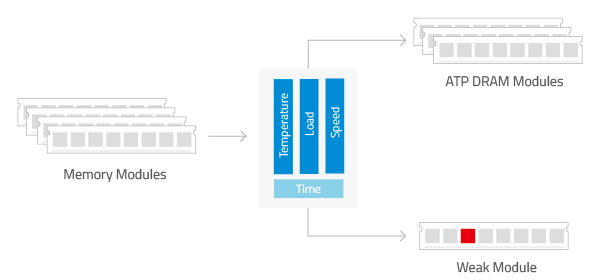
- Functional Testing: Automatic Testing Equipment (ATE). Major integrated chips (ICs) used in ATP DRAM products are sourced from Tier 1 manufacturers and undergo meticulous testing to ensure excellent reliability and longevity. All DRAM modules undergo stringent functional testing using the Automatic Testing Equipment (ATE) to detect structural and component defects and to screen out marginal timings and signal integrity (SI).

- System Testing: Test During Burn-In (TDBI). At mass production (MP) level, all the modules are subjected to Test During Burn-In (TDBI), which combines temperature, load, speed and time to stress-test the memory module and to screen out weak ICs. ATP’s TDBI aims to effectively screen out defective DRAM chips that will potentially fail during the early life failure (ELF) period. By ensuring that only robust DRAM chips are on the module, TDBI significantly lowers failure rates and extends the product service life. A module carries multiple DRAM ICs, so even a very small marginal-failure rate per chip compounds into a meaningfully higher failure rate at module level; TDBI detects and screens out these marginal chips to ensure the DRAM modules’ reliability.
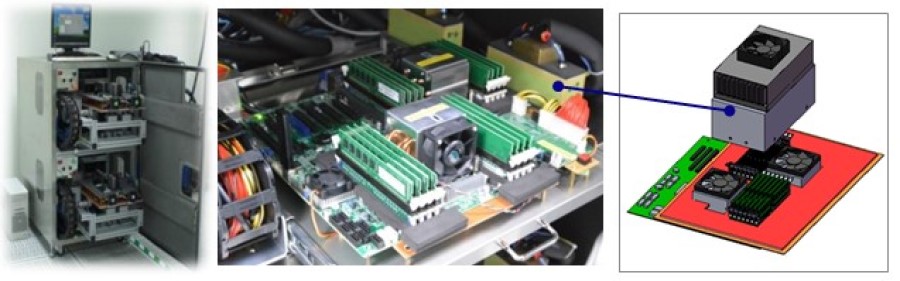
- ATP Mini Chamber. During TDBI, the specially designed ATP Mini Chamber isolates the temperature cycling to the targeted area so only the modules are subjected to burn-in. This makes it easy to find the root cause of failure and keeps the motherboard in stable operation.
Conclusion
ATP’s industrial DRAM products are available in legacy SDRAM and a complete range of DDR1, DDR2, DDR3, DDR4 and DDR5 modules in different densities and form factors. For more information, visit the ATP website or visit an ATP Distributor/Representative in your area.
Frequently Asked Questions (FAQ)
Q1: How does ECC memory reduce downtime in industrial PCs?
A: ECC (error correcting code) memory reduces downtime in industrial PCs by detecting and correcting single-bit memory errors in hardware, in real time, so the most common class of memory error — the soft error — is fixed before it crashes the system or corrupts data. In industrial deployments, where PCs run unattended and a memory-induced crash means a stopped line or a technician dispatched to a remote site, ECC turns most memory errors from outages into log entries. Because a side-band ECC module’s corrections are visible to the host, platforms that log ECC events can flag a module with a rising error count for replacement during planned maintenance instead of letting it fail in service. ECC requires a processor and memory controller that support it.
Q2: What is the difference between correctable and uncorrectable memory errors?
A: A correctable memory error is one the ECC mechanism can repair — generally a single-bit error — and it causes no downtime and no data corruption. An uncorrectable memory error exceeds the ECC’s correction capability — generally a multi-bit error — and can crash or immediately shut down the system. Standard SECDED ECC corrects single-bit errors and detects, but cannot correct, double-bit errors; tolerating the failure of an entire DRAM chip requires Chipkill (Advanced ECC) platforms.
Q3: Can standard ECC memory correct multi-bit errors?
A: No. Standard ECC DIMMs implement SECDED — single-error correction, double-error detection — which corrects any single-bit error and detects, but cannot correct, double-bit errors. Errors spanning more bits, up to the failure of a whole DRAM chip, are handled by Chipkill or Advanced ECC, implemented by the platform’s memory controller together with ECC DIMMs. Chipkill-class protection is specified for mission-critical systems — medical equipment, industrial controllers, data centers — where an uncorrectable error and the crash it causes are unacceptable.
Q4: How can you tell if a memory module is ECC or non-ECC?
A: The definitive check is the module’s part number or datasheet, which states ECC support explicitly. A visual rule of thumb works on DDR4 and earlier generations: a non-ECC module carries data chips in multiples of eight per rank (a 64-bit data bus), while an ECC module adds one extra chip for every eight — nine or eighteen chips instead of eight or sixteen — for a 72-bit bus. On DDR5, the module is organized as two independent subchannels and the extra-chip arithmetic differs, so chip-counting is no longer a reliable indicator; read the label or datasheet.
Q5: Does ECC memory eliminate downtime in industrial PCs?
A: No. ECC corrects single-bit soft errors and detects double-bit errors, but it cannot repair hard errors — permanent physical defects that require module replacement — and standard SECDED cannot correct multi-bit errors. Minimizing memory-related downtime combines several layers: ECC for in-service correction, Chipkill-class platforms where no uncorrectable error is tolerable, modules screened for early-life failure with ATE functional testing and TDBI burn-in, and a temperature grade matched to the environment. The reverse also holds: an industrial PC running non-critical workloads in a climate-controlled, easily serviced cabinet does not need ECC, and a non-ECC module such as ATP’s Momentum line does the job at lower cost.